Keino
Conductor AI app icon

Conductor AI: Teams of AI agents that plan, delegate and check their own work.

Agents split the job, call real tools and pass results along. Failed steps retry or switch models, risky actions wait for a person, and every step is traced and costed as it runs.

The live demo is by invite. The runs below are real recordings.

Loading the recorded run…

Three workflows, one engine

Real jobs, each a different way of working together.

Research a question, with sources you can check.

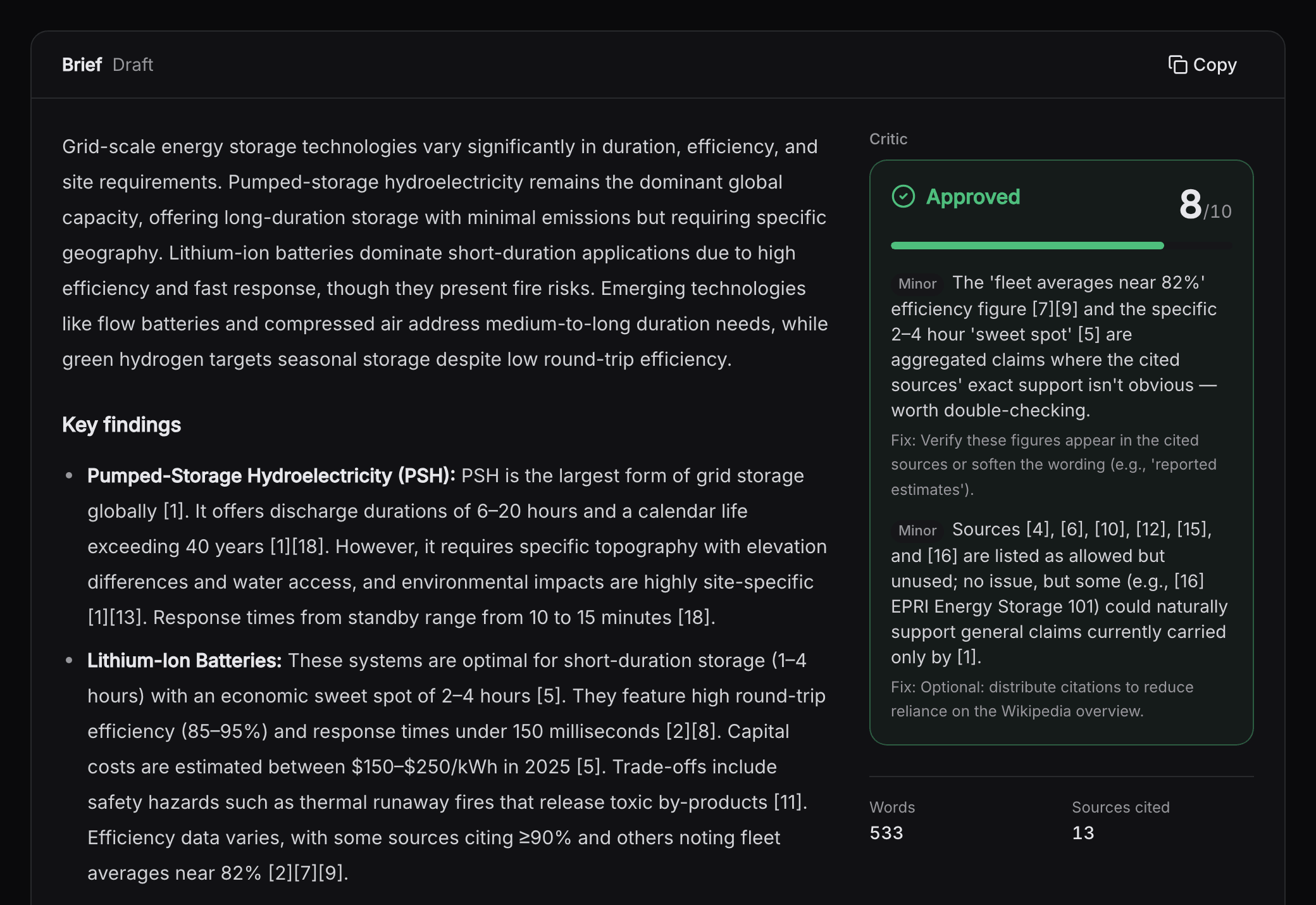
A planner splits the question into three to five tasks. Researchers search and read the web in parallel, an analyst merges what they found, and a writer drafts the brief. A critic checks every claim against its source and can send the draft back twice.

  • Planner and workers
  • Parallel fan-out
  • Critic loop
A finished research brief on grid-scale energy storage, with numbered citations, and the critic's review beside it approving the draft.

Support tickets, with a person in the loop.

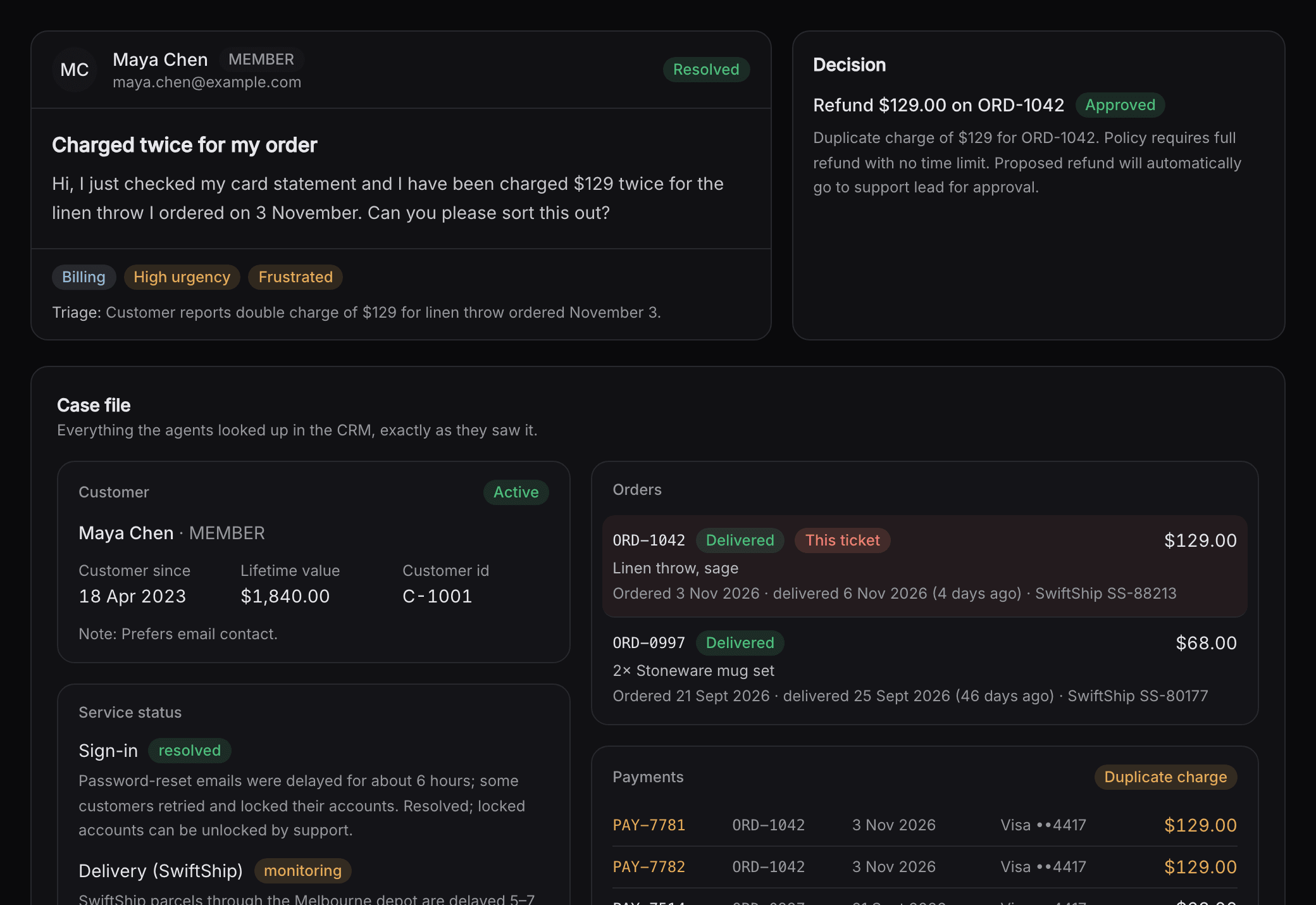
A triage agent classifies the ticket, looks up the customer, their orders and payments, reads the refund policy and proposes an action. Refunds wait for a support lead to approve or reject with a note. Then a resolver applies the decision in the CRM and writes the reply.

  • Step procedures
  • CRM tools
  • Human approval
A support ticket about a double charge, the triage agent's findings, and the support lead's approval of a $129 refund.

Supplier contracts reviewed, every finding quoted.

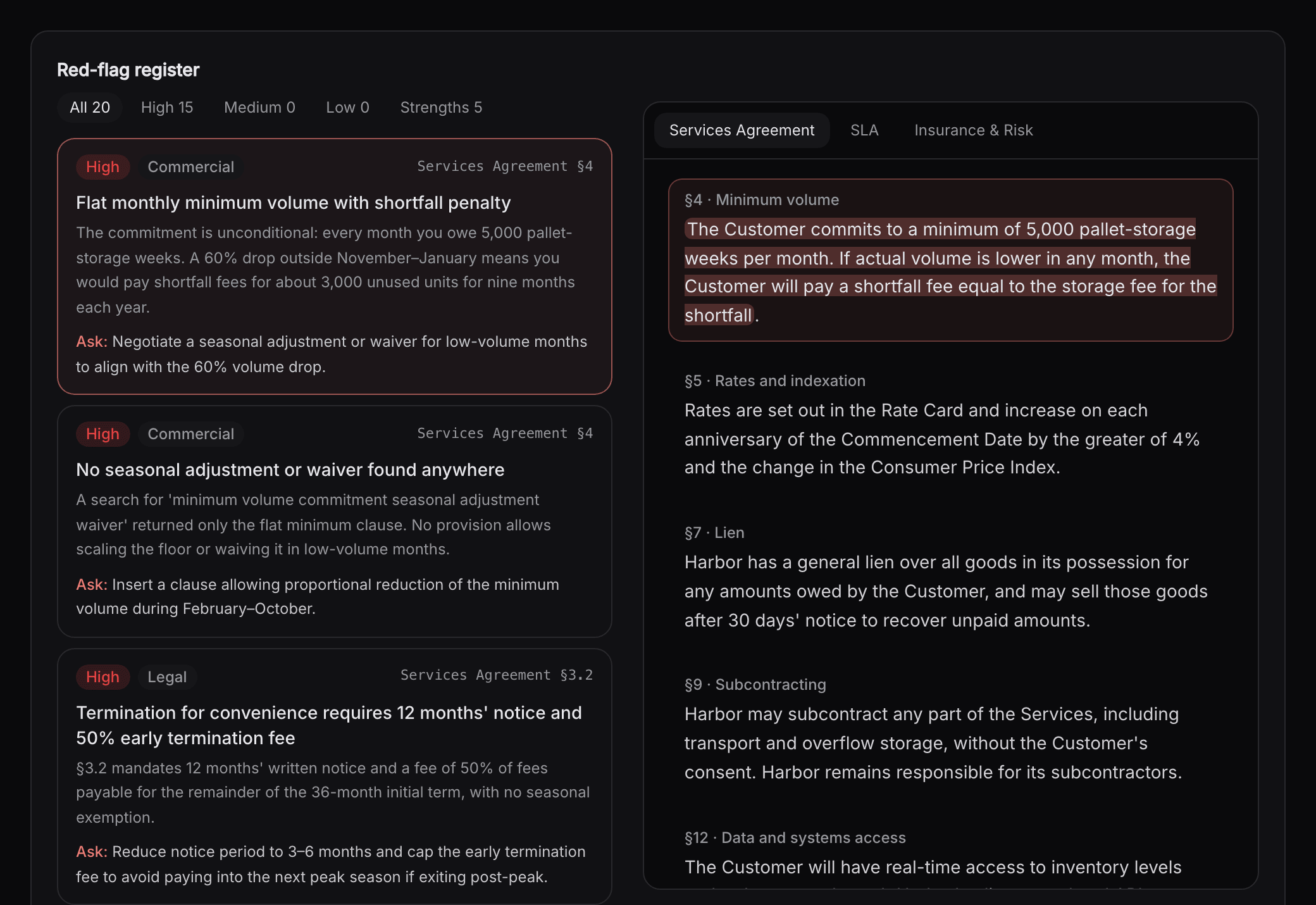
A router sends each question to a legal, security or commercial reviewer. Reviewers search the supplier's documents by meaning and answer with the exact clause. A check drops any quote that isn't in the contract word for word, and a summariser turns the rest into a risk register.

  • Router
  • Search over documents
  • Checked quotes
A supplier risk register for Harbor Logistics, with the quoted contract clause highlighted in the document beside it.

How it works

Workflows, agents and steps, written as code.

Each level is a plain TypeScript definition, so adding an agent, a tool or a whole workflow is a code change, reviewed and tested like any other.

Workflow

A graph of agents: who runs first, who runs in parallel, and when work loops back for another pass.

plan → research ×4 → analyse → write ⇄ review

Agent

One file with its instructions, tools, models, spend cap and a procedure of steps with routes between them.

classify → investigate → propose → approval

Step

One unit of work: a model call with a typed output, a bounded loop of tool calls, a direct tool call or a pause for a person.

crmGetPayments(customerId) → 2 charges of $129

Durable runs

Every step runs as a step of a durable workflow on Convex. If a server restarts mid-run, the run carries on from its last finished step, and an approval can wait for days without holding anything open. Each event streams to the live view as it happens.

Under the hood

Built to fail safely, and to show you how.

  • Retries and fallback models

    A failed or slow model call retries with backoff, then moves to a different model so the run still finishes.

  • Spend caps per agent and run

    Each agent and each run has a budget. A run that reaches it stops cleanly and keeps everything done so far.

  • Chaos testing

    Force a tool error or a model timeout on any step, then watch the retry and the recovery in the trace.

  • Guardrails in code

    Citations must come from real tool results, refunds must match a real order, and quotes must match the contract.

  • Human approval

    Risky actions pause the run until a person approves, or rejects with a note the agent has to answer.

  • A model per agent

    Agents pick from a registry of open-weight and small frontier models. Switching one is a one-line change.

  • Evaluations

    Fixed test cases score each workflow on checks passed, cost and speed, with a model from another family judging writing quality.

  • Live trace

    Every handoff, tool call, retry and guardrail appears as it happens, with tokens and cost for each step.

  • Step inspector

    Open any step to read its prompt, tool calls and results, output, model, attempts and cost.

  • Search by meaning

    Documents are embedded and searched by meaning, scoped to one supplier's files.

  • Cancel any time

    Stop a run mid-flight. Finished steps, their output and their cost stay on record.

  • Daily spend limit

    A global cap and a kill switch keep the public demo's costs predictable.

Built with

What it runs on.

Convex
Database, durable workflows, vector search and the live updates behind the trace.
Next.js and React Flow
The dashboard, the agent graph and this page.
OpenRouter
Open-weight models such as DeepSeek, Qwen and GLM, plus small frontier models, behind one API.
Vercel AI SDK
Streaming, tool calls and typed, validated output.
Tavily
Web search for the research agents.

Questions.

Can I try it?

Yes, by invite: every run spends real model credits. Request access below and you'll get a sign-in link by email.

Can you build something like this for my team?

Yes. The engine is built to take new agents, tools and workflows, so we can shape it around your processes, your data and your approval rules. Book a call and tell us what you'd want it to do.

Which models does it use?

Open-weight models by default, because they're cheap and fast enough for most steps. Each agent's model is set in one place, and the evals compare options before we change a default.

Live demo

Run it yourself.

The live demo is by invite, since every run uses real model credits. Leave your email and we'll send you a sign-in link.

We'll only use your email to get you into the demo. Privacy policy

Want one for your own team? Book a call (opens in a new tab)

Already invited? Open the live demo

Designed and built by Keino.

See what else we build
Conductor AI: Multi-Agent Orchestration | Keino